 PDFJadoo
Independent tool — not a government service
PDF Jadoo is an independent tool. It is not affiliated with, endorsed by, or representing any government, embassy, exam board or official authority. The photo specifications in this tool follow the official sources linked on this page — always confirm the current requirement on the authority's own website before you apply.
One photo in — the exact official size out
Drop a portrait, pick the country and the exact document, and press Generate — the maker finds your face, frames your head to the official proportion, cuts you out with an on-device AI portrait model and sets the backdrop to your document’s colour — then exports the exact official pixel size, inside the portal’s file-size window (small minimums count too), plus a print sheet of copies at true size. 70 photo sizes — the country and portal specs with every figure checked against the issuing authority’s own page (the spec list at the bottom of this page shows each official source), plus the common sizes for CVs, job applications and admission forms.
Official photo specifications — sources
The photo sizes and requirements in this tool follow the official specifications published by each authority. The most used ones:
- Canada (IRCC): canada.ca — passport photo specifications
- U.S. visa & DS-160 photos: travel.state.gov — photo requirements
- U.S. DV Lottery: dvprogram.state.gov
- India SSC: ssc.gov.in
- India IBPS: ibps.in
Every other specification in the list at the bottom of this page links its own official source. PDF Jadoo is an independent tool — it is not affiliated with, endorsed by, or representing any government entity. Always confirm the current requirements on the official website before you apply.
or click to choose a clear front-facing photo — or a photo of your signature on white paper
No camera photo ever leaves this device — it is made here in your browser, exactly like a file you pick.
On capture, only the light is tidied — gentle exposure, colour balance and glare softening. Your face and the background are never altered. For official photos, stand against a plain, evenly lit wall.
What kind of photo?
Any pose is fine — standing or sitting, any clothes, any background. Just face the camera straight, like this:
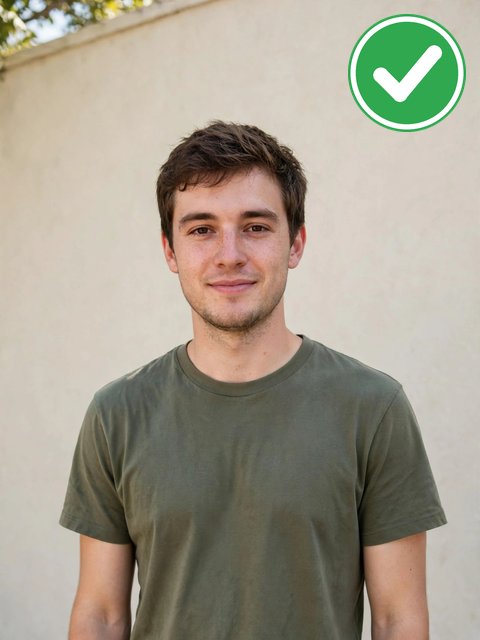
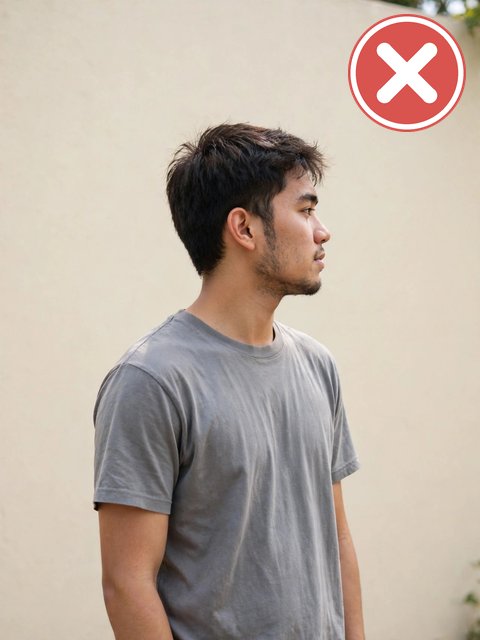
White background, honestly: pick White above and Generate rebuilds the backdrop in plain white — made for CVs, job and admission forms and personal use. For official passport and visa photos, several authorities reject a digitally changed background; for those, keep a photo taken against a real plain wall — every such spec carries its own warning on this page.
Only used by the simple backup colour cleaner, if both AI cut-out engines fail to load.
🔒 Private by design: this tool runs entirely in your browser. Your file is never uploaded and never stored. The AI model files download once to your device; after that, everything works offline.
How it works
- Drop a clear, front-facing portrait (or a flat photo of your signature for the exam signature specs).
- Pick the country and the exact document — the panel shows the official size, file window, background and head guidance, with a link to the authority's own page.
- The maker finds your face and frames it automatically, so the head sits between the gold guides (chin-to-crown is what officials measure). Nothing to adjust — a quiet “Adjust manually” link is there only if you ever want it.
- The Background row is already set to the exact colour your document requires — white for most, a specific colour for some. Tap a different swatch only if your authority asks for another colour.
- Press Generate my photo. The AI portrait model cuts you out and fills the backdrop with the chosen colour. You see the exact pixel size and the achieved file weight before downloading — including whether it landed inside the portal’s KB window.
Every specification in the list below was checked against the issuing authority's own page on 10 November 2026. Where an authority publishes only a range (Australia) or only a file window (UPSC), the spec says so, and the tool outputs a size inside it. Where we could not verify a number from an official source — Pakistan's PPSC photo figure, for example — the spec is simply not in the list.
White-background photos for CVs, job applications and admission forms
Not every photo here is for a passport office. The same maker also prepares the photos everyday forms ask for: a photo for a CV or resume, a job application photo and a university admission photo — all in the picker above at the size most commonly asked for, 35 × 45 mm, and each labelled plainly as a common size, because no authority publishes one worldwide figure for them. When an employer, portal or university gives its own exact size or file window, follow theirs — the big portals (SSC, IBPS, UPSC, FPSC and the NTA exams) carry their own verified presets in the list.
To make a white-background photo online: add your photo, pick the size you need, choose White in the Background row, and press Generate my photo. An AI portrait model that runs entirely in your browser separates you from the backdrop and fills it with clean white; your photo never leaves your device. If your photo was already taken against a plain, evenly lit wall, the original may need no change at all — the maker can also leave the background untouched and set only the size and file weight.
The honest limit: a made white background is an edited photo. For CVs, job and admission forms and personal use, that is exactly what is wanted. For official passport and visa photos it can be the reason for a refusal — several authorities require an original, unedited photograph, and every such spec on this page carries a prominent warning. For those, stand against a real plain white wall and keep the original.
Every spec in this tool — and its official source
| Country / portal | Document | Exact output | File window | Background | Source |
|---|
Related wishes
JPG to PDF
Photos into a PDF.
Scan Documents
Phone photos of pages become a straightened, cleaned, proper PDF.
ID Card Scan
Front and back of a card, cleaned and laid out on one page.
Compress PDF
Shrink a PDF under a portal's upload cap.
Or browse the full deck of 130 free PDF tools.
Passport & ID Photo — fair questions
Will my application be accepted?
The size, crop and file weight will be exactly what the spec says. Acceptance also depends on the photo's content — background, lighting, expression, glasses and recency rules — which stay yours to get right. The spec panel links the authority's own page so you can check before submitting.
Is the background really replaced?
Yes — an AI portrait-matting model that runs entirely in your browser separates you from the backdrop and fills it with the colour in the Background row above the Generate button, which starts on the exact colour your document requires. The model downloads once (about 23 MB) to your device; your photo never uploads. If the model cannot load, a backup AI cut-out — and then a simpler colour cleaner — take over, and the result panel tells you which one was used. Hair edges against very busy backdrops can still be imperfect, and a photo taken against a real light wall remains the most reliable option. Some authorities forbid edited backgrounds altogether — those specs carry a prominent warning, and the choice to edit anyway is yours, at your risk.
My portal wants the file between two sizes, like 20–50 KB. Can a photo be too small?
Yes — several exam and visa portals reject files under their minimum as firmly as over their maximum. When a spec has a KB window, this tool adjusts the JPEG quality to land inside it, and pads the file up into the middle of the window if the picture is too light. The result panel shows the achieved weight before you download.
How many copies are on the print sheet?
As many as fit the sheet you choose — a 4 × 6 in sheet (the photo-lab standard) or A4 — at the spec's true millimetre size, with cut guides. The sheet is a PDF, and it is offered for specs that have a printed size.
Why is a spec I need not listed?
Only specifications verified against an official source are included. If a number circulates on guide sites but the authority itself does not publish it, we leave it out rather than guess.
How do I make a passport-size photo online with a white background?
Add a clear, front-facing photo, choose your country and document — or the standard 35 × 45 mm size — set the Background row to White, and press Generate my photo. The maker frames your head to the official proportion, rebuilds the backdrop in plain white on your own device, and exports the exact pixel size inside the portal’s file window, plus a print sheet at true size. For official passport and visa photos, read your spec’s warning first: some authorities reject a digitally changed background and want an original photo taken against a real white wall.
How do I make a white-background photo online?
The same way, at any size in the picker — a CV photo, a job or admission form photo, or a passport size. Choose White in the Background row and press Generate; the AI cut-out runs in your browser and your photo is never uploaded. If the photo was already taken against a plain light wall, you can leave the background untouched and let the maker set only the size and file weight.
What size photo do I need for a CV or a job application?
There is no single official size. 35 × 45 mm on a plain white background is the most commonly asked for and printed, and it is the CV / resume and job application preset in the picker, labelled as a common size. Some employers ask for 2 × 2 inches instead — that standard size is in the list too. Government job portals publish their own exact figures; when you apply through one, use its own preset (SSC, IBPS, UPSC, FPSC and BPSC are all in the list).